I have always been terrible with money1. I’m probably far from the worst-case scenario, though. After all, I don’t gamble, and I didn’t accumulate debt during my school years.
But to be perfectly honest, that had more to do with not wanting to go out, chase fashion, or be a tourist, and with having a materially supportive family than with me planning or even knowing my budget.
Then the 2025 winter holiday season came around. I had an internship lined up in a few months, and I was ready to move
to Chicago. Suddenly, I decided to get it together and start budgeting. I was also bored; Chicago was windy and cold
as ever, and our dog and I had nothing else to do2.
Solution Specification#
I already self-host a bunch of applications, and for my financial records, I’d like to own my data and not get locked into some kind of subscription model.
If you search around, there are quite a few open-source, local-first options: Firefly, Budgetzero, and so on. In the end, I picked Actual for these reasons:
- it looks nicer
- it has more stars on GitHub (…)
- !!! it has bank-sync3
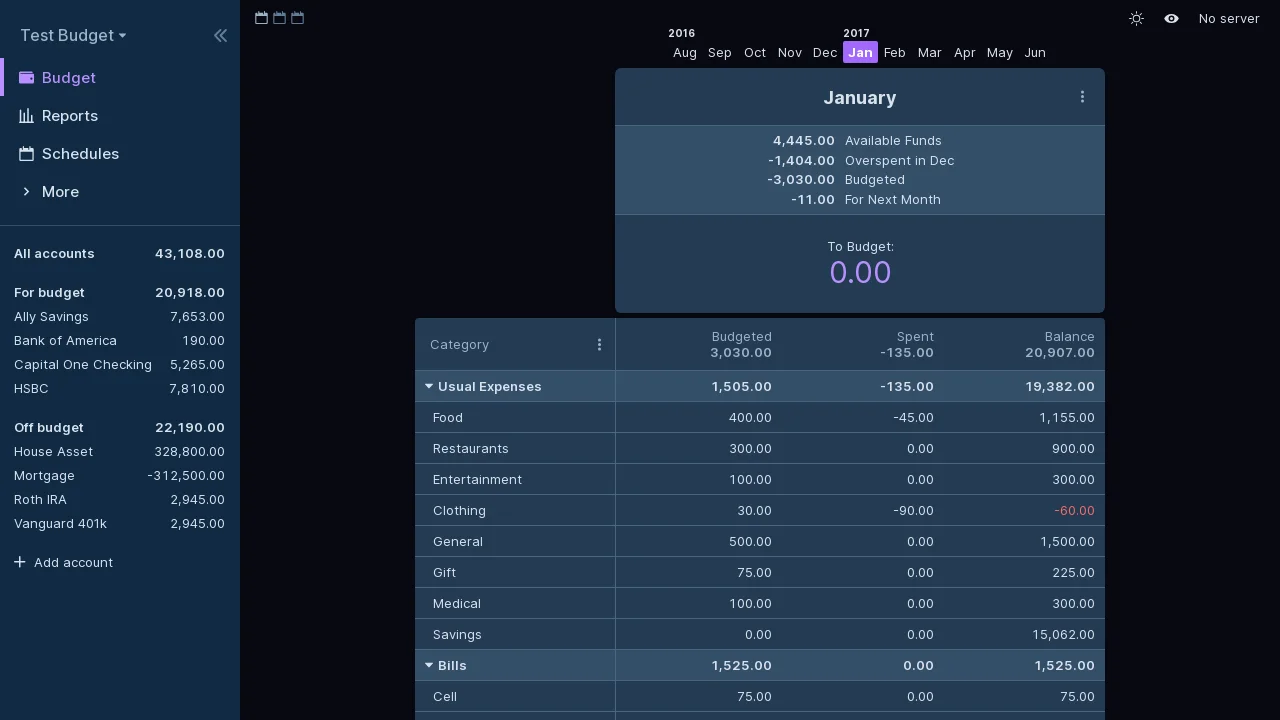
Screenshot from Actual’s documentation:
The ADHD Compromise#
At this point, I knew myself well enough to know there was no way I would manually import all my past statements and keep doing it in the future. For one, there are O(10) accounts I’d like to track, and I’m likely to screw something up in the beginning, since I’m new to (envelope) budgeting and the particular Actual software.
More importantly, if I were to manually download statements monthly and import them into Actual, I could only categorize and tag each expense once a month — and I’d probably forget what it was for by that point. The alternative is to manually enter transactions in real time, then delete or replace them when the monthly consolidated statements from my banks come around. That option implies way too much work, and my brain does not like doing stuff knowing it will be replaced in a few weeks.
So for now, I need some scaffolding until I figure out my typical spending, learn the software, and build some kind of habit. The bank-sync is provided by SimpleFIN, which updates roughly every 24 hours and can retrieve up to 90 days depending on your bank.
The Initial Hurdle#
Most banks provide at least a couple of years’ worth of statements, so my plan was to:
- Get 2024 and 2025 data into Actual using historical statements
- Start 2026 by budgeting ahead and using SimpleFIN for syncing
Banks almost always provide CSV, QIF, OFX, QFX, or CAMT files for your past transactions, and Actual supports all of them. In this case, OFX/QFX is recommended.
However, getting all the transactions in is not the difficult part. The difficult part is deciding two things:
- Should each account be “on budget” or “off budget”?
- What’s the category of each transaction?
For unfamiliar readers (like I was), Actual recommends envelope budgeting. The mental model is this:
- You have an envelope with
<category name>written on it - When you budget, you put in each envelope.
- When you spend, you only take money from the corresponding envelope.
This has two implications: you NEED a category for each transaction, and if you budget correctly, each envelope should come out to 0 for each budgeting period 4.
When I imported two years’ worth of transactions, I was looking at over 3000 of them. There are community projects to automate tagging with AI, such as Actual AI, but the point of envelope budgeting is to figure out what your actual envelopes are, so I worked through the categorization manually.
Deciding the Categories#
As I was trying to give each transaction a category, I quickly realized this was going to be a work in progress for a while, because finding a useful way to slice your budget to just the right granularity is tricky. For instance, I want my categories to reflect a gradient of necessity and rigidity. Bills is for absolute necessities such as rent and cell phone plans, and then there are the “necessary but not completely rigid” expenses, such as transit costs and food. But “food” is not just one big basket. There are groceries, there is takeout (which should be separate if you want to be conscious about that number), and then there is luxury dining for special occasions.
A common criticism of the category system is that it’s one-dimensional and exclusive. As I illustrated above, when you think of a fancy meal, it should be part of the “food” category in the sense that you literally eat it. But it should also be in a “Luxury” or “Going out” category so you know it belongs to the flexible, reducible part of the budget. Alas, Actual does not support multi-category transactions5, for good reasons, such as the fact that you can’t get a pie chart report that way. More on that later.
Split Categories#
Although an expense cannot occupy multiple categories, you can split a single transaction across multiple categories if you can assign different amounts to each split. For example, if you went to Costco and bought groceries as well as home improvement items, you probably want to split that into two categories instead of trying to make the total amount occupy two categories.
Rules#
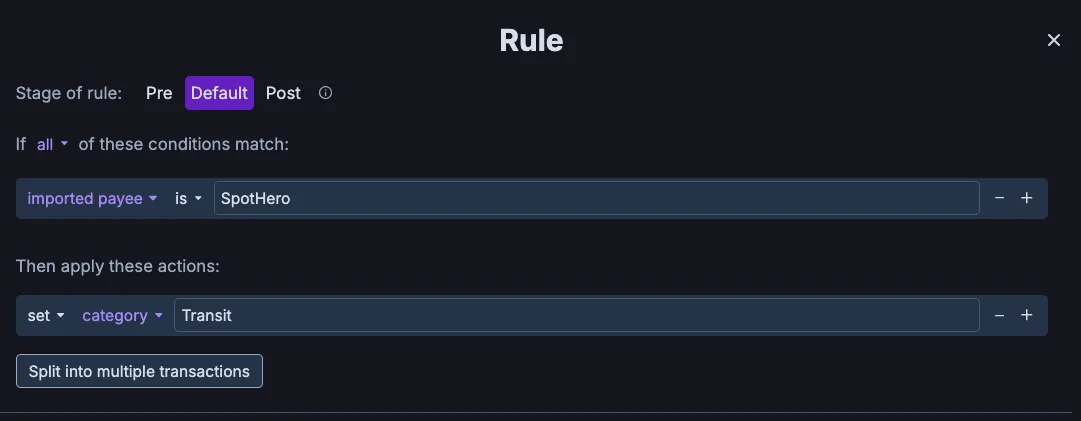
Actual has a feature called Rules to make this process easier, so I didn’t have to literally tag 3000 things. Rules work by pattern matching. For example, when the payee name matches a certain pattern, the rule tags the transaction with a category. It’s a bit like email client rules for archiving based on address and title. Of course, you can retroactively apply the rules. So my workflow was to scroll around and find the most common patterns and try to apply the rules.
Handling Credit Cards#
Like any good ol’ confident consumer
these days, most of my spending goes through a credit card. When you spend money, it is straightforward: you have a Payment
transaction, for which you subtract money from the corresponding category. But when you pay the credit card, it’s a bit
awkward.
A credit card payment generates two transactions in your record:
- a
Deposittransaction in your credit card account, since you have paid off the credit card debt - a
Paymenttransaction from your, say, checking account, since that’s also an “on budget” account and you just took money out of it.
Overall, your accounts’ total value doesn’t change because you’re just moving money from a checking account to a credit card account. The money was spent when the transaction happened, not when the debt is paid off, but the payoff still creates two extra transactions.
This is roughly what Actual recommends when it comes to credit cards. The tl;dr is: don’t spend money you don’t have, and don’t pretend a credit card account is off budget 6.
But in addition to that, I have a specific Credit Card Payment category which I exclude from all spending reports
to avoid double-counting. Wait, double-counting in what, you may ask. This is where the Reports feature comes in.
Reports#
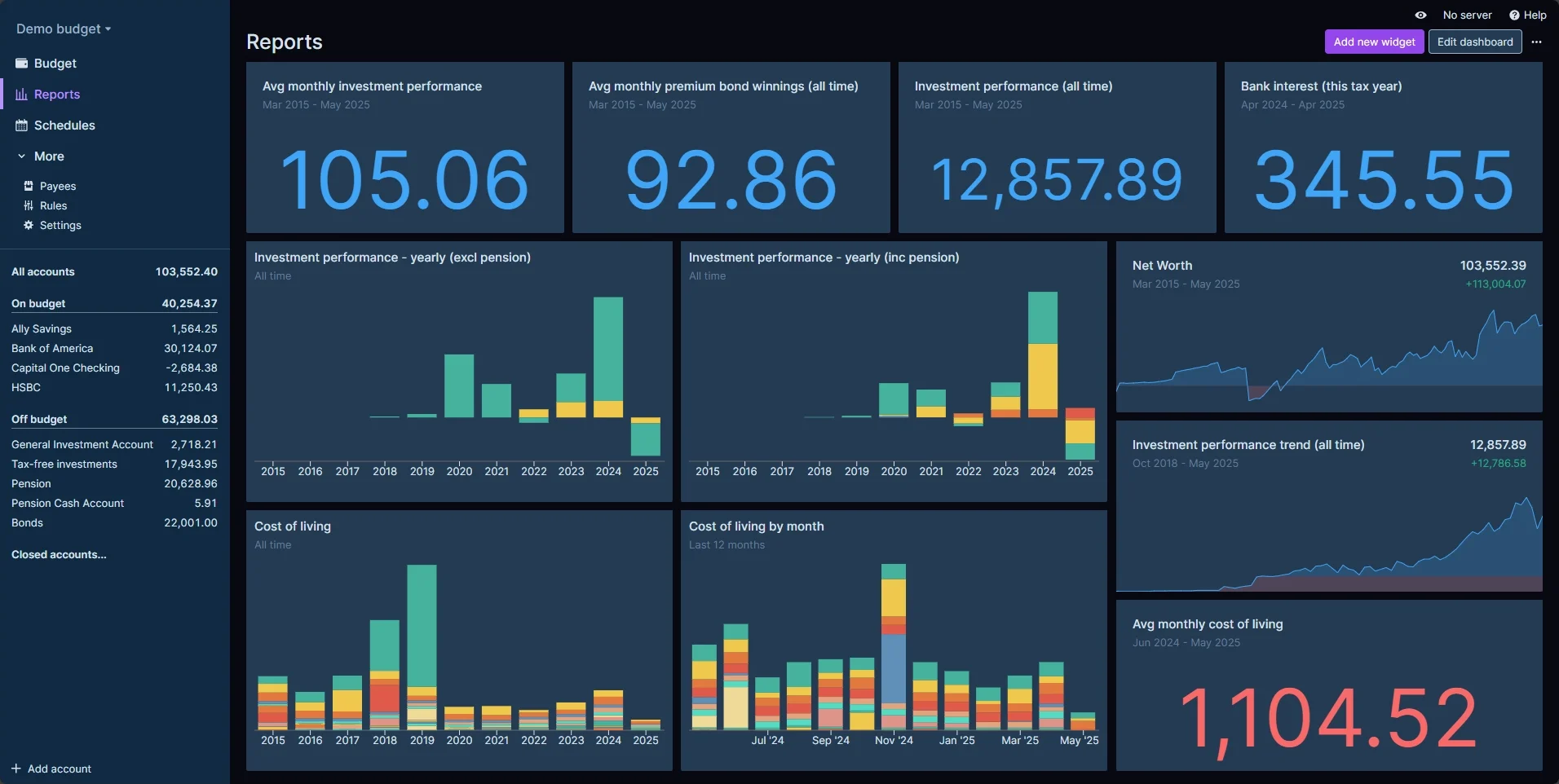
I think Reports might be doing the heavy lifting when it comes to keeping me hooked on syncing transactions and punching in those categories. In short, the Reports dashboard allows you to make many visualizations and live7 calculations. I simply cannot resist looking at a bunch of numbers and number visualizations!
Examples of reports:
But here’s also where avoiding double counting matters. Imagine you spent $10 on a burger using a credit card. Since your credit card
account is automatically synced, you will get a $10 transaction from Payee: Burger place. This is what we want,
because we want a per-transaction breakdown. For a while, you will have debt in the credit card account.
Later, you pay off the credit card debt, which generates two more transactions. In total, you now have three transactions:
- Account: credit card, Type: Payment, Amount: $10
- Account: credit card, Type: Deposit, Amount: $10
- Account: checking, Type: Payment, Amount: $10
If you generate a report, say, Year-to-Date Spending, using the following filters:
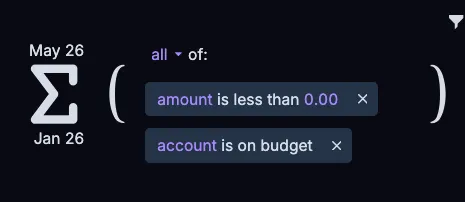
You will see, incorrectly, spending of $20 instead of $10. This is the double-counting problem. The workaround is to
add another condition: if Category is Not Credit Card Payment, which filters out the duplicate credit card payment 8.
Reimbursement#
Finally, one last thing I recently ran into is dealing with reimbursement. In essence, it is a bit like a credit card, except the debt is carried by your entire account (and depending on how quickly you get reimbursed, you may need to carry “debt” for a few months, on paper).
I don’t particularly like the pre-funding approach outlined in Actual’s
documentation. What ended up working for me was to
simply roll over the debt and eventually cancel it out by putting the reimbursement Deposit into the corresponding
categories.
This process has a similar problem to our credit card double-counting issue — your reimbursed transactions will still show up in spending reports. Actually, a closer analogy would be when you eat out with friends and they Zelle you for part of the bill, what do you do?
The cleanest approach is to have a category just like Credit Card Payment, which you always exclude from all
calculations. You could do that if the nature of the transaction is truly reimbursement, such as when you pay out of
pocket for work or when you split a bill with friends.
I’m not disciplined enough to do this perfectly, so for now, I treat most reimbursements as fluid transactions: I want to see my full spending to urge myself to spend more conservatively.
Footnotes
-
At least on the spending side of it. ↩
-
Getting pet dogs to Hawaii is tricky. ↩
-
“but what happened to owning your data?” ↩
-
In practice, I fiddle with the budget to make it zero after the month has ended, so each budgeting period is zero-sum. ↩
-
It does support tags, and you can have many tags for a single transaction. But it’s more suitable for one-off events than for trying to use it as multi-category support. ↩
-
I can’t imagine why anyone would do that. If you put a credit card off budget, how are you going to get per-transaction categories? ↩
-
Meaning the displayed content rolls forward with time. ↩
-
Another possible workaround is to use budgeted amounts instead of real spending and make sure each category is always zero-sum. ↩